Help
Everything you need to find your way around FBT Social, folded into sections. Open the one you need.
Getting started
Three steps, all through Discord
- Join the Discord. Registering, verification, events and collabs all start there. Our verify bot gives you the Verified role.
- Sign in here with Discord. Your dashboard is your control panel: your clubs, your nights, your performer profile.
- Pick your way in. Run a club, dance or DJ. Each path is a few steps, below.
Club owner guide
Register, host, climb
- Register your group. In the Discord's #start-here, press Register my group (or run /group register). You get a group number and an access code that puts your posters up in the club.
- Get Verified. Once a rep has the Verified role, your club is approved, gets the Verified badge and can collab.
- Link your VRChat group with /group link. That turns on the Join button in the world and lets your group rooms count toward your heat.
- Host a night. Post it on Host a night or with /event create. It goes on the Playbill, gets announced in Discord, and your crowd is counted automatically.
- Make it yours. On My club, upload posters, a logo, banner and gallery, and pick your colour. Staff approve each image.
- Team up. Add managers from My dashboard, and co-host with other clubs on Collabs: both clubs earn the night in full, plus a bonus.
Finding talent
- Add a dancer roster or DJ sets when you post a night. Verified performers claim them in one tap, and you get a Discord DM introducing each one, with how to reach them.
- Browse The Talent for verified dancers and DJs, and invite anyone who's open to bookings to one of your nights. They answer with one tap.
- Still need people? On your night's page, Ask for talent posts the open spots to our talent channel and pings the Dancer or DJ role. Once per night.
- After the night, mark anyone who didn't show on the night's page (within 48 hours). It's private.
- Clashed with someone? Report a problem on the night's page. You won't be matched again, and it never becomes public.
The three levels
- Standard. Every club starts here, free. Posters 1–11 on the sidewalk, at the street entrance and in the entrance hall where everyone arrives, a venue page, a place in the Marquee race, and collabs once one of your reps has the Verified role in our Discord.
- Premium. Apply and staff approve. All 32 posters (12–32 are inside the club), the entrance billboard, the photo-wall backdrop and a Join Group button in the world.
- Headliner. Earned: the top 25 Premium clubs on each month's Marquee, for the whole next month. Everything in Premium, plus Headliner billing in gold on the Marquee, your venue page and your nights.
Levels change your badge and what you unlock, never how much heat you earn.
Poster map
Where every poster number is in the world
Posters are numbered in the order guests walk in, from the sidewalk to the stage. Every club gets 1–11; Premium and Headliner clubs get all 32. Upload yours on My dashboard → your club → Customize, or with /poster submit in Discord.
- Street & entrance: 1–6. Every club.
- Entrance hall (where you arrive): 7–12. Every club for 7–11; Premium & Headliner for 12.
- Lobby & elevator hall: 13–18. Premium & Headliner.
- Main hall: 19–26. Premium & Headliner.
- Stage wall: 27–32. Premium & Headliner.
Art is portrait 2:3, ideally 1024 × 1536.
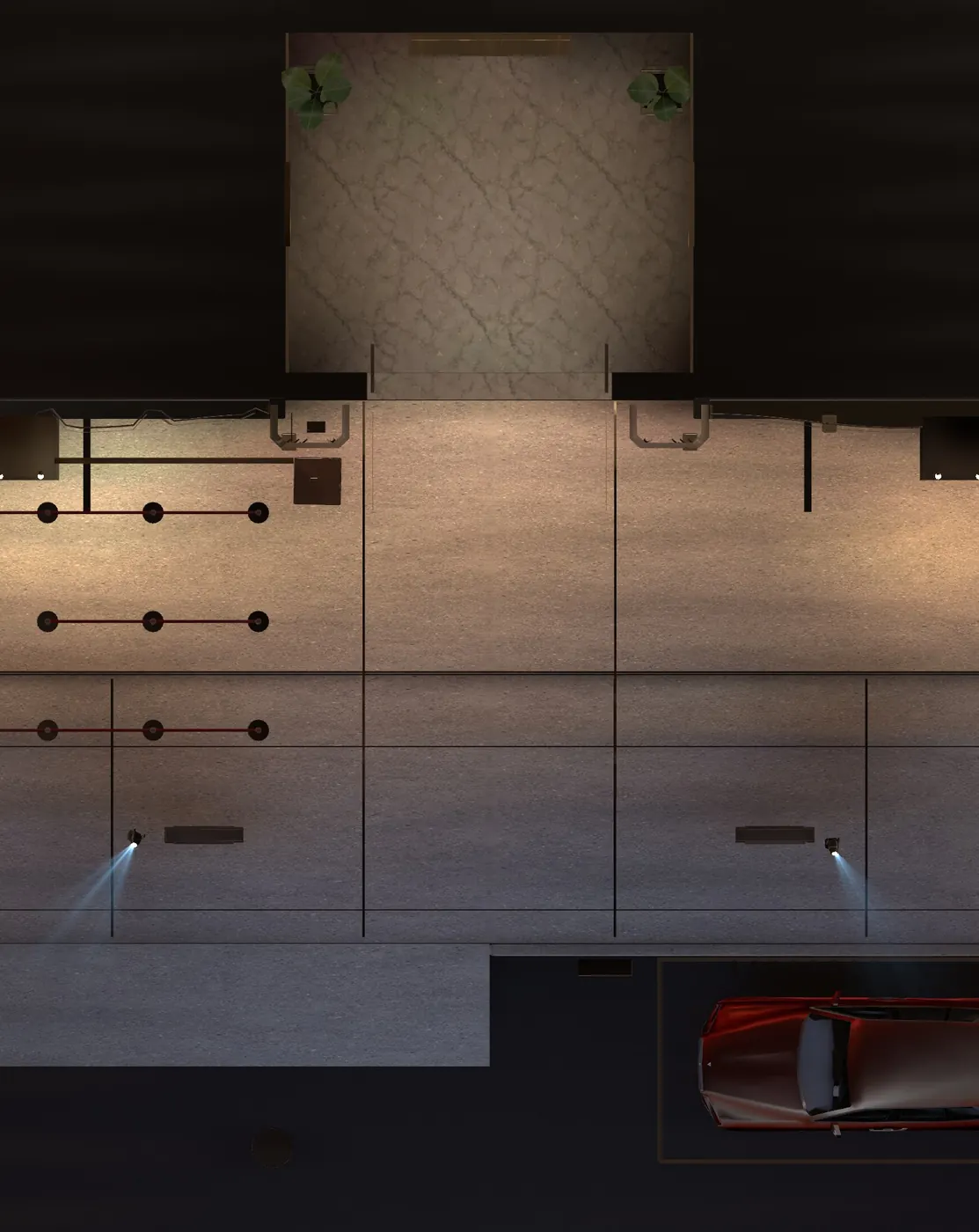
Poster 1
Sidewalk, left totem, street side
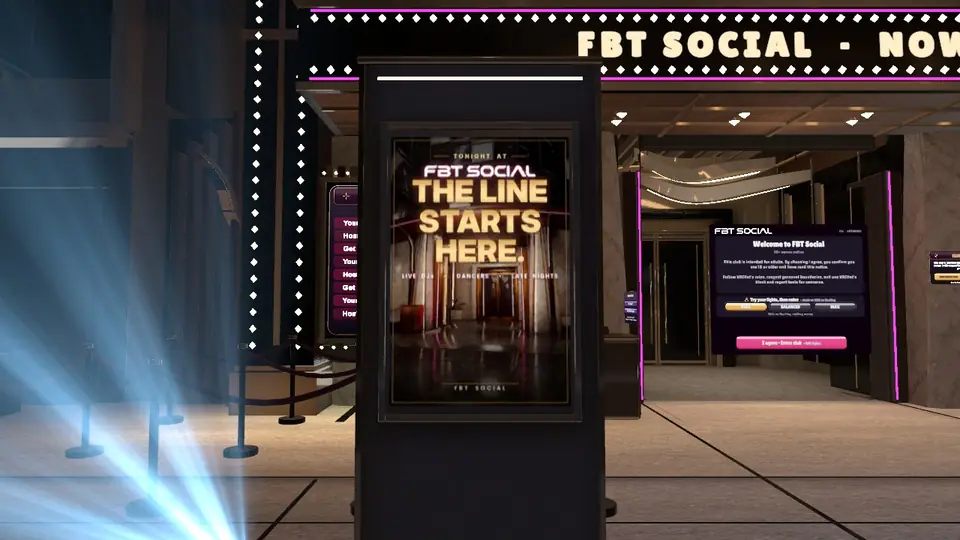
Seen from the street as guests walk up to the club. The white frame shows where the art goes.
Left and right are as you walk in, facing the stage (on the street, facing the club door).
Dancer guide
Perform at nights across every club
- Get Verified in the Discord. That's all it takes to be eligible.
- Verify as a performer on My dashboard: pick Dancer (or Dancer and DJ), paste your VRChat profile link, then send a friend request from that account to our verification account and tap Done. Only the owner of an account can send a request from it, so that's the proof. We check your 18+ age verification, give you the Dancer role and decline the request.
- Claim a spot. Hosts open a dancer roster on their nights; join it in one tap on the event page or in Discord. The Playbill's Needs talent filter shows every night with open spots.
After you claim
- Our bot DMs you and the host to introduce you: who your host is, the club's VRChat group to join, and to arrive about 15 minutes early. You get a reminder about two hours before.
- Can't make it? Give up your spot on the event page as early as you can. More than two hours ahead never counts against you; the host can mark a late drop or a no-show, and several no-shows pause your sign-ups for a while.
Your page in The Talent
Verified performers get a page on The Talent: your VRChat name, what you perform, your line, and the nights and clubs you've performed at. Facts only, never ratings. On My dashboard you choose whether you're listed, whether you're open to bookings (hosts can invite you), and whether to show a Message on Discord button (off unless you turn it on).
Upload your pole wrap, chair art and deck logo on My dashboard. They appear on stage whenever you perform, and on your page once approved.
Something wrong with a host or another performer? Use Report a problem on the night's page. It's private: you two won't be put on the same night again, and nobody is told who reported.
DJ guide
Play sets at nights across every club
- Get Verified in the Discord.
- Verify as a performer on My dashboard, the same way dancers do: pick DJ (or both), paste your VRChat profile link, send a friend request to our verification account and tap Done. You get the DJ role in Discord.
- Claim sets. Hosts open set times on their nights, and verified DJs claim them on the event page or in Discord.
After you claim, you get the same intro and reminder DMs as dancers, your own page in The Talent, and the same controls over it. See the dancer guide above.
Already verified as a dancer? Tick DJ on My dashboard and the DJ role is added. No need to verify again.
Heat and ranking
How the Marquee is scored
- Heat is real crowds. Head counts are sampled through the night. The hotter your room gets, the higher you climb the Marquee. Running longer doesn't add points; filling up does.
- A night counts once it runs an hour or more. Shorter nights are ignored, never held against you.
- A night's score is its peak crowd plus its biggest queue: everyone inside at the busiest moment, and everyone waiting to get in.
- Your Marquee score is the average of your best three counted nights this season. One lucky night won't carry you and one quiet night won't sink you. A club that runs once a week can win with three packed nights.
- Seasons run monthly. The top three are crowned in the Hall of Fame, and crowns, rings and records stay on your page for good.
- Streaks count the weeks in a row you've hosted a night, and add a small bonus to your Marquee score: +5% at two weeks, +10% at three or more. Collab nights give every partner club the full night.
- Nothing else counts. Member numbers, levels and anything bought in the Shop never add heat.
See the Marquee or the detailed numbers on the leaderboard.
FAQ
Quick answers
- Does it cost anything?
- No. Registering a club, hosting nights, performing and everything else on the site is free. The Shop is optional and never affects heat or rank.
- Who can come?
- FBT Social is for adults 18 and over. Age-verified (18+) rooms are encouraged and rewarded, but how a host sets up their room is up to them.
- Does my member count help my rank?
- Never. Only the crowd that turns up on the night counts. A small club that packs its room beats a big group with an empty one.
- How does FBT Social count crowds?
- Our own VRChat account reads the head count of FBT Social rooms and of tracked clubs' group rooms every few minutes. It counts how many people are in a room; it doesn't keep a list of who was there.
- How do I get Premium or Headliner?
- Apply for Premium on Premium & Headliner; staff review every application. Premium clubs agree to run age-verified rooms and to let our tracking account into the club's VRChat group. Headliner is earned, never applied for: when each month's season ends, the top 25 Premium clubs on the Marquee become Headliners for the whole next month. It's automatic, so nobody can buy or ask their way in.
- My club disappeared from the site. Why?
- A club with no counted night for 60 days is taken off the site quietly. Nothing is deleted. Bring it back from My dashboard and host a night.
- How do I advertise my club, a night or my store?
- Buy a homepage ad in the Shop. Ads run until the weekly reset (Sunday at noon Eastern), first come, first served. Custom ads are reviewed before they go live.
- Can I put my art inside the world?
- Yes, two ways: advertise in the world. The Skyline Billboard on the FBT tower shows up to five ads in turn, $15 a month, starting when FBT approves the art (one slot per club, with a waitlist when it's sold out). Or take your own storefront on the street facing it: always on, never shared, $25 for six months or $40 for a year, starting when it goes up with the next world update. Either way you're only charged once the art is approved.
- Do ads renew? Do I need to cancel?
- No. Each ad is a one-time payment for that week, so there's nothing to cancel. Receipts are under My dashboard.
Support
Talk to the team
The fastest way to reach us is the Discord. Ask in the help channel, or message a staff member directly for anything private.
If someone breaks VRChat's rules, report them with VRChat's own tools first (their profile, then Report), then let a staff member know. We handle serious matters quietly and in private.
Open the Discord